> ## Documentation Index
> Fetch the complete documentation index at: https://docs.anygen.io/llms.txt
> Use this file to discover all available pages before exploring further.
# AnyGen Knowledge Base · Extract from Link
> Import web pages or Feishu / Lark cloud documents into your AI assistant's knowledge base.
This guide explains how to use the **Extract from Link** feature to import web pages or Feishu / Lark cloud documents into your AI assistant's knowledge base.
**Quick Summary**: Copy a Feishu document or wiki link → paste it into the **Extract from Link** dialog → click **Add**. The system will automatically crawl and add the content so the AI can reference it.
## Entry Point
On the AI assistant's **Knowledge Base** edit page, click **Extract from Link**. A dialog appears:
* **Title**: Extract from Link
* **Supported**: web links, Feishu / Lark cloud document links
* **Input**: paste the target link
* **Hint at bottom**: Feishu / Lark wiki links extract up to 1000 documents
## Knowledge Base Capacity Limits
Per-assistant knowledge base limits (apply to both **Extract from Link** and **Upload File**):
| Dimension | Limit |
| ------------------------------------------------------------- | -------------------- |
| Single Feishu wiki global link (`/wiki/space/...`) extraction | Up to 1000 documents |
| Total files per assistant knowledge base | Up to 2000 |
| Total size per assistant knowledge base | Up to 1 GB |
## Supported Link Types
| Type | Example | Description |
| ------------------------------------- | -------------------------------------- | --------------------------------------------- |
| Web link | `https://example.com/article` | Any publicly accessible HTTP/HTTPS page |
| Feishu cloud doc (single) | `https://xxx.feishu.cn/docx/xxxx` | Crawls the full document |
| Feishu Base | `https://xxx.feishu.cn/base/xxxx` | Crawls the Base content |
| Feishu Sheet | `https://xxx.feishu.cn/sheets/xxxx` | Crawls the Sheet content |
| Feishu wiki node | `https://xxx.feishu.cn/wiki/xxxx` | Crawls only this single node (no descendants) |
| Feishu wiki global link | `https://my.feishu.cn/wiki/space/xxxx` | Crawls all documents in the wiki (up to 1000) |
| Lark doc / Sheet / Base / Wiki / file | `https://xxx.larksuite.com/docx/...` | Same as above, overseas environment |
## Unsupported Content
The following link types **cannot** be imported; please use file upload or another method:
* **WeChat Public Account articles** (`mp.weixin.qq.com`): not supported by the crawler; blocked on submission
* **Feishu / Lark** **Slides**: only **native** Slides created in Feishu / Lark (links like`slides/...`) are unsupported
To import a native Slide created in Feishu / Lark, either copy its content to a regular Feishu / Lark cloud doc (docx) first, or export it as a local file (`.pptx`) and upload it into Feishu / Lark, then import via its file link.
## How to Import a Single Feishu / Lark Cloud Document
Open the target Feishu / Lark native document or uploaded file cloud document in your browser.
Copy the full URL from the address bar (e.g. `https://xxx.feishu.cn/docx/...` for a native doc, or `https://xxx.feishu.cn/file/...` for a file cloud document).
In AnyGen, open the AI assistant's **Knowledge Base** → click **Extract from Link**.
Paste the link into the input box.
Click **Add**. The content is added to the assistant's knowledge; the AI will reference it automatically.
## How to Import a Feishu / Lark Wiki
Two methods, choose based on your use case:
### Method 1: Wiki Node Link Import (single node)
Use this when you want to import a single wiki node as a knowledge document.
Open the target wiki in Feishu.
Find the node you want to import.
Copy that node's link (e.g. `https://xxx.feishu.cn/wiki/...`).
Paste it into the **Extract from Link** dialog, click **Add**.
The system crawls **only this node** — it does **not** recurse into descendants. To import the entire wiki, use Method 2.
### Method 2: Global Wiki Import (up to 1000)
Use this when you want to import an entire wiki from the root in one go.
Open the target wiki in Feishu.
Click **Share Wiki** in the lower-left.
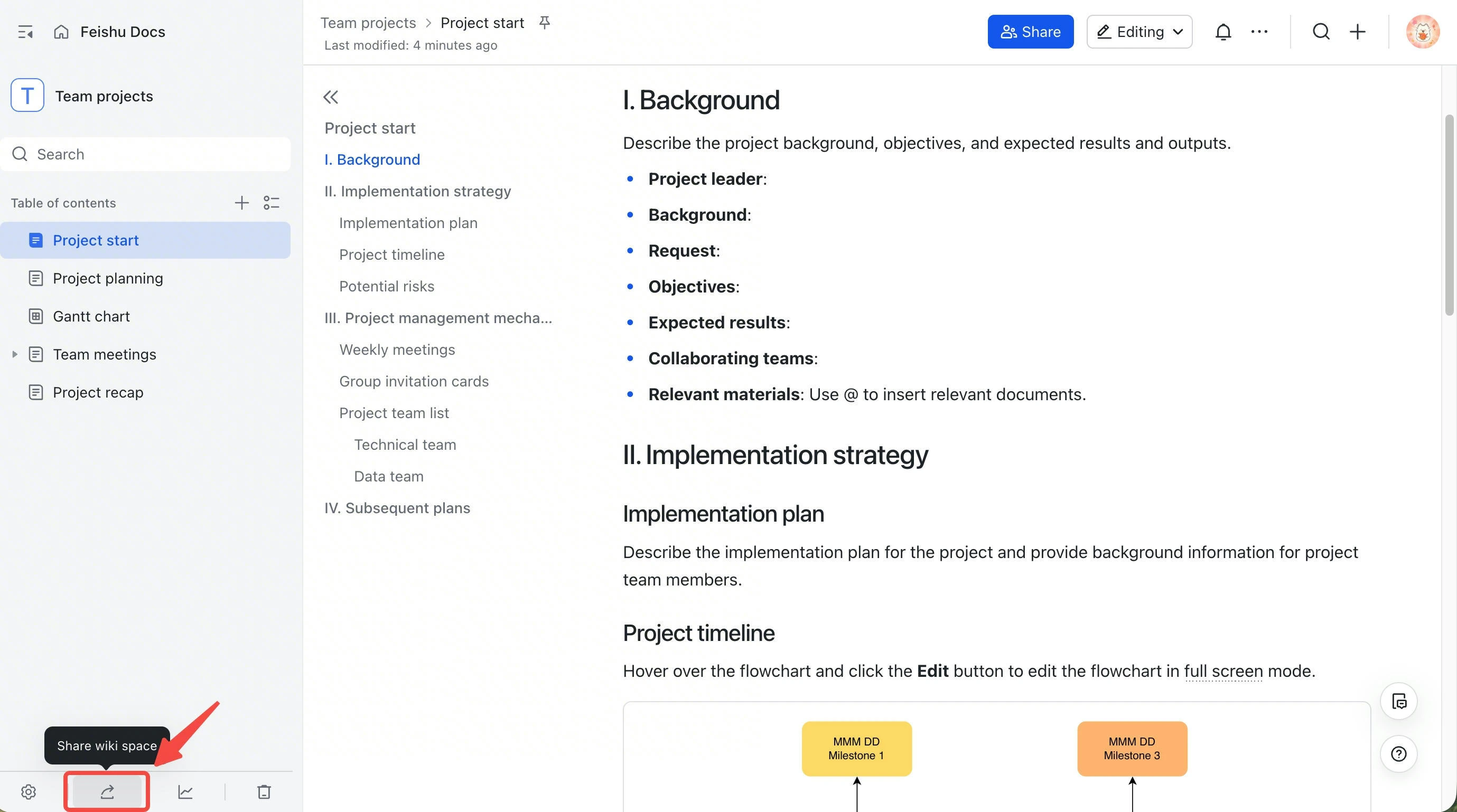 Copy the generated global share link (e.g. `https://my.feishu.cn/wiki/space/...`).
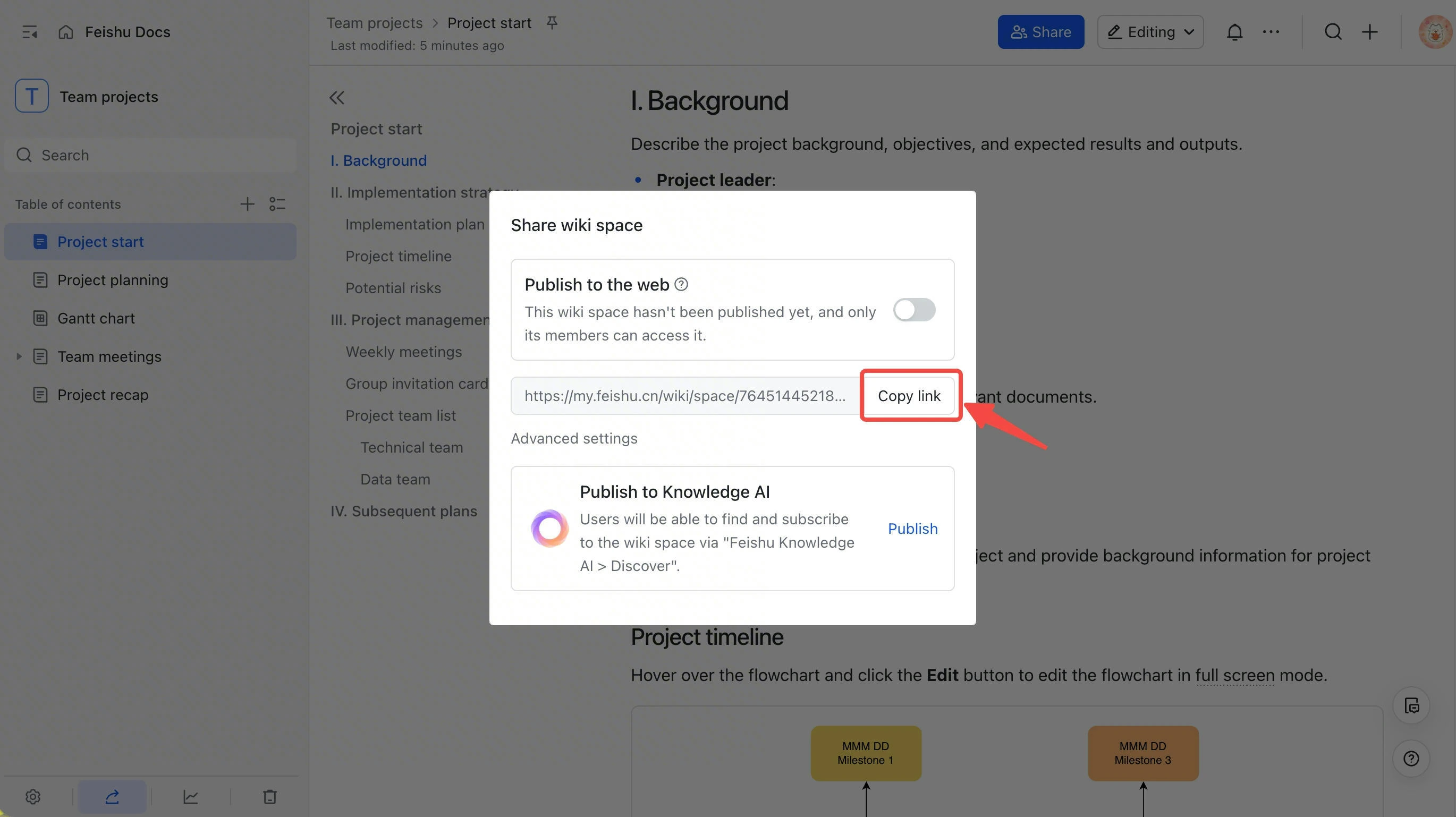 Paste it into **Extract from Link**, click **Add**.
The system detects it as a global wiki link and crawls all documents, **up to 1000**.
## Permissions (Important)
Access rules differ by link type:
* **Feishu document / Base / wiki**: access **inherits from the current signed-in user's Feishu read permission**. If you can open the link in Feishu, AnyGen can crawl it — **no public-link setting is required**.
* **Generic web page**: must be **publicly accessible without login**. Pages that require login, are behind a paywall, or are intranet-only cannot be crawled.
Import failures are usually caused by one of these conditions not being met.
### Recommended Steps
1. Confirm the Feishu account currently signed in to AnyGen can open the target document / wiki in Feishu.
2. If you can't open it, request read access from the document / wiki owner.
3. Once you can open it, copy the link and paste it into the **Extract from Link** dialog.
**Wiki child node permissions**: when bulk-importing via the global link (Method 2), check in **Wiki Settings → Permission Management** that all child nodes you need imported are readable by the current user. If only some sub-documents are crawled, it is usually because child nodes did not inherit the permission.
## FAQ
The link doesn't match URL format. Check:
* The URL is copied in full from the browser address bar
* Starts with `http://` or `https://`
* No stray punctuation or whitespace
The most common cause is **insufficient permission**: Feishu content requires the current signed-in user to have Feishu read access; generic web pages must be openable without login.
Investigation order:
1. **Can you open it in Feishu?** Open the link in your browser with the same Feishu account currently signed in to AnyGen and confirm you can read it.
2. **Child-node permission** (global link / Method 2 only): see the wiki child-node permission note under **Permissions** above.
3. **Link type**: confirm it's not a WeChat article, or a **native** Feishu / Lark Slide (created in Feishu / Lark).
4. **Network reachability**: for web links, confirm the page is reachable on the public Internet (not an intranet-only domain).
A global share link (`my.feishu.cn/wiki/space/...`) imports up to 1000 documents per call. If your wiki exceeds 1000 documents, suggestions:
* Split the content into multiple sub-wikis, generate a global share link for each, and import them one by one.
* Or pick the 1000 most-referenced documents, organize them into a new wiki, and import that.
Pages that rely on JavaScript rendering (SPAs, login-required, paywalled) are unreliable. Suggestions:
* Copy the content into a Feishu cloud doc first, then import via the Feishu link.
* Or directly upload a PDF / Word / Markdown file.
Feishu Docs, Sheets, and Base all support an **Auto Sync** option. On the assistant's **Knowledge Base** page, find the **Auto Sync** config and turn it on — the system will periodically re-crawl the latest content.
Yes. An uploaded file is stored as a **file cloud document** (`/file/...` link) and can be imported via Extract from Link. This differs from a **native cloud document** Slide created directly in Feishu / Lark, which is **not** supported — see **Unsupported Content** above.
## When to use "Extract from Link" vs Upload File
| Scenario | Recommended | |
| ---------------------------------------------------------- | ------------------------------------------------------------ | - |
| Content updates continuously (operations manual, API docs) | **Extract from Link** (Feishu doc + Auto Sync) | |
| One-time reference material (contract, report, PDF) | **Upload File** | |
| Intranet / paywalled / dynamically-rendered pages | **Upload File** (paste into a Feishu doc first, then import) | |
## Feedback
If you encounter an issue not covered here or have suggestions, please contact the AnyGen team.
Paste it into **Extract from Link**, click **Add**.
The system detects it as a global wiki link and crawls all documents, **up to 1000**.
## Permissions (Important)
Access rules differ by link type:
* **Feishu document / Base / wiki**: access **inherits from the current signed-in user's Feishu read permission**. If you can open the link in Feishu, AnyGen can crawl it — **no public-link setting is required**.
* **Generic web page**: must be **publicly accessible without login**. Pages that require login, are behind a paywall, or are intranet-only cannot be crawled.
Import failures are usually caused by one of these conditions not being met.
### Recommended Steps
1. Confirm the Feishu account currently signed in to AnyGen can open the target document / wiki in Feishu.
2. If you can't open it, request read access from the document / wiki owner.
3. Once you can open it, copy the link and paste it into the **Extract from Link** dialog.
**Wiki child node permissions**: when bulk-importing via the global link (Method 2), check in **Wiki Settings → Permission Management** that all child nodes you need imported are readable by the current user. If only some sub-documents are crawled, it is usually because child nodes did not inherit the permission.
## FAQ
The link doesn't match URL format. Check:
* The URL is copied in full from the browser address bar
* Starts with `http://` or `https://`
* No stray punctuation or whitespace
The most common cause is **insufficient permission**: Feishu content requires the current signed-in user to have Feishu read access; generic web pages must be openable without login.
Investigation order:
1. **Can you open it in Feishu?** Open the link in your browser with the same Feishu account currently signed in to AnyGen and confirm you can read it.
2. **Child-node permission** (global link / Method 2 only): see the wiki child-node permission note under **Permissions** above.
3. **Link type**: confirm it's not a WeChat article, or a **native** Feishu / Lark Slide (created in Feishu / Lark).
4. **Network reachability**: for web links, confirm the page is reachable on the public Internet (not an intranet-only domain).
A global share link (`my.feishu.cn/wiki/space/...`) imports up to 1000 documents per call. If your wiki exceeds 1000 documents, suggestions:
* Split the content into multiple sub-wikis, generate a global share link for each, and import them one by one.
* Or pick the 1000 most-referenced documents, organize them into a new wiki, and import that.
Pages that rely on JavaScript rendering (SPAs, login-required, paywalled) are unreliable. Suggestions:
* Copy the content into a Feishu cloud doc first, then import via the Feishu link.
* Or directly upload a PDF / Word / Markdown file.
Feishu Docs, Sheets, and Base all support an **Auto Sync** option. On the assistant's **Knowledge Base** page, find the **Auto Sync** config and turn it on — the system will periodically re-crawl the latest content.
Yes. An uploaded file is stored as a **file cloud document** (`/file/...` link) and can be imported via Extract from Link. This differs from a **native cloud document** Slide created directly in Feishu / Lark, which is **not** supported — see **Unsupported Content** above.
## When to use "Extract from Link" vs Upload File
| Scenario | Recommended | |
| ---------------------------------------------------------- | ------------------------------------------------------------ | - |
| Content updates continuously (operations manual, API docs) | **Extract from Link** (Feishu doc + Auto Sync) | |
| One-time reference material (contract, report, PDF) | **Upload File** | |
| Intranet / paywalled / dynamically-rendered pages | **Upload File** (paste into a Feishu doc first, then import) | |
## Feedback
If you encounter an issue not covered here or have suggestions, please contact the AnyGen team.