Template Reuse: Make a Copy & Save as Template
On AnyGen, there are two ways to reuse created content or creation workflows.Make a Copy
Generate a copy of the current file, suitable for iterative creation or branch version management.
- Reuse Content: Summarize, rewrite, or translate.
- Reuse Style: Retain original structure and style.
- Data Update: Update sections with latest data.
Save as Template
Save the complete creation process as a reusable template.
- Call Method: One-click launch from Homepage “My Templates”.
- Sharing: Support browsing and reusing team templates.
Data Integration & Efficiency
Data Integration & MCP Access
AnyGen supports seamless connection with real work environments:- One-Click Access Connectors: Support data sources like Google Drive, Slack, Lark, etc.
- Custom MCP: Flexibly access more custom tools via MCP (Model Context Protocol).
Advanced Efficiency Features
Parallel Tasks
You can start multiple tasks simultaneously. Pro version supports 5 parallel tasks, and Max version supports 10.
Scheduled Tasks
For periodic work, you can set scheduled tasks in “Scheduled Tasks” to let AnyGen complete tasks at specified times.
Voice Input
AnyGen automatically polishes voice input:
- Intelligent Denoising: Filter filler words like “uh, um”.
- Logic Reshaping: Fix slips of the tongue and adjust order.
- Style Polishing: Improve expression professionalism.
Plans & Credits
Plan Versions & Subscriptions
AnyGen offers Plus, Pro, and Max versions. You can view plan benefits, total credit balance, and credit consumption details for each task in **Avatar **-> Settings -> Subscription & billing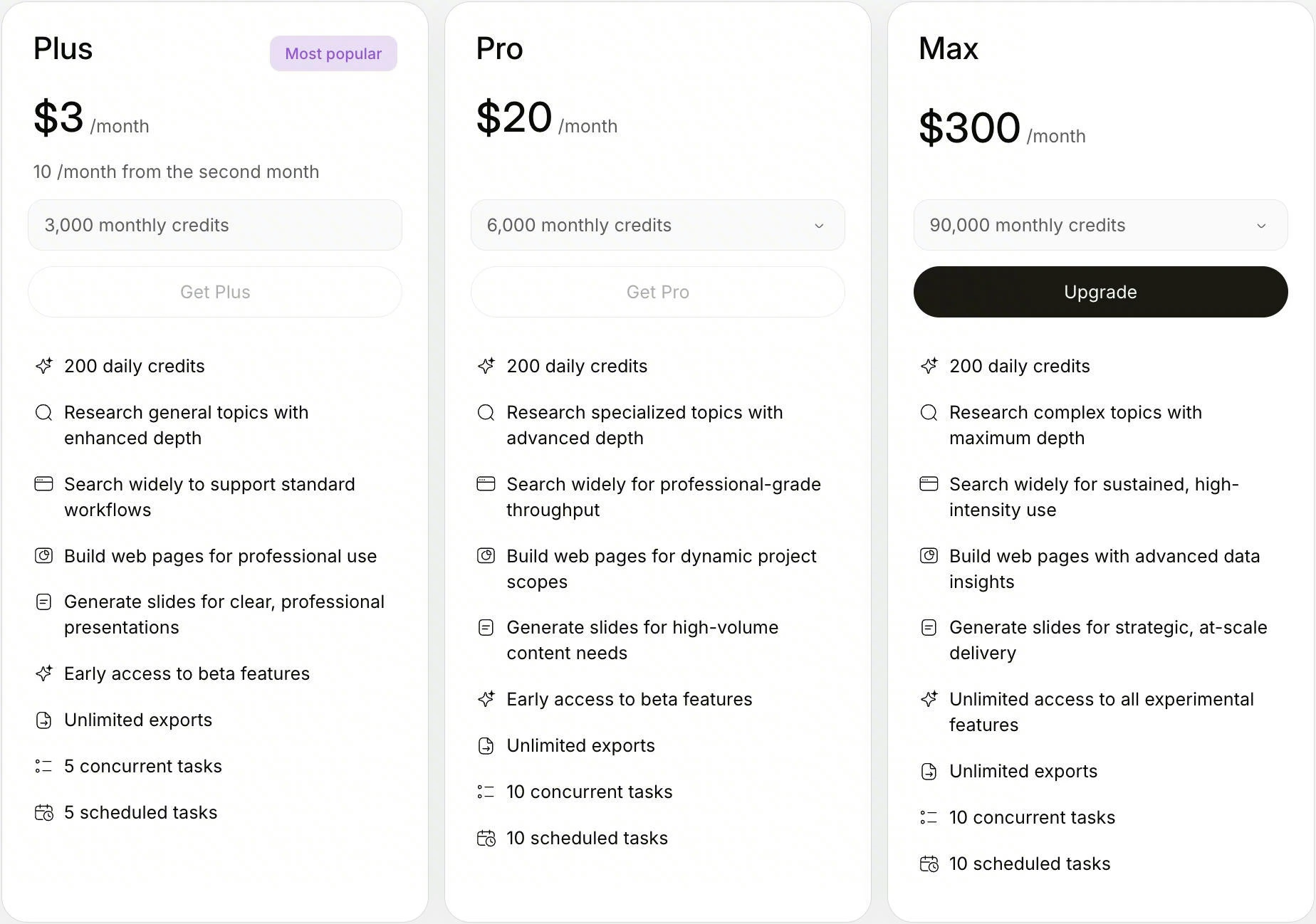
Ways to Get Credits
- Rewards
- Daily login rewards.
- Complete beginner tasks.
- Referrals: Invite new users to register.
- Purchase: Purchase credit booster packs.
Other Settings
Sidebar
Set as “Always Visible” or “Default Collapsed”.
Language
Set default system language.
Daily Summary
Enable daily insight pushes based on historical conversations.